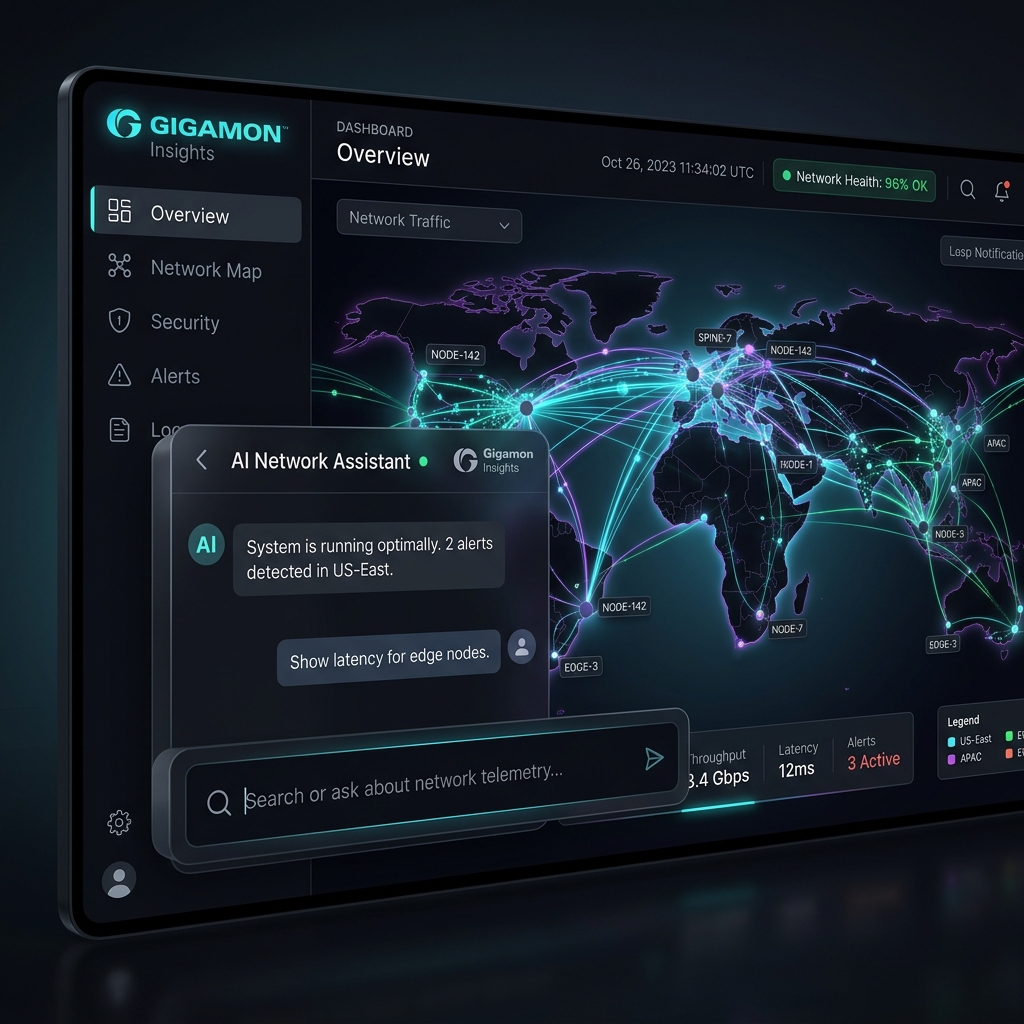
A New Kind of Product Challenge
Most enterprise products begin with established workflows. This one didn't.
Gigamon Insights was an opportunity to reimagine how security and network teams interact with observability data. Instead of navigating dashboards, writing queries, and stitching together information across tools, users could simply ask questions and receive contextual answers.
The challenge wasn't designing another interface. The challenge was defining what an AI-powered observability experience should be.
The Strategic Threat
AI categories are rapidly shifting. Junior UX processes fail in greenfield platforms where standard patterns do not exist. This case study demonstrates how we addressed design ambiguity, established trust, and productized complex LLM interactions.
The Opportunity Hidden Beneath The Data
Gigamon already generated valuable network intelligence through AMI and AMX. Yet much of that value remained hidden.
Insights consumed Gigamon telemetry through downstream tools, making the source of that intelligence largely invisible to users. This created a strategic opportunity:
That question became the foundation of the product vision.
Making Sense Of The Landscape
Before exploring interfaces, I mapped the ecosystem surrounding the product. I analyzed existing investigation workflows, enterprise AI product patterns, observability platforms, conversational interfaces, security operations, and admin workflows to understand where existing solutions created friction.
Finding The Tensions
As patterns began to emerge, I identified four core tensions shaping the experience:
Users wanted an intuitive chat box to ask anything instantly.
Administrators needed granular configuration and output boundaries.
Allowing users to explore telemetry data through unguided questions.
Structuring prompts to verify outputs and prevent hallucinations.
AI automatically generates network performance summaries.
Administrators need verifiable evidence and telemetry traces.
Introducing a brand-new chat-to-canvas conversational paradigm.
Making sure the app complies with standard platform release schemas.
Defining The Experience North Star
Once the tensions became clear, I established a design vision: **From Data Access To Decision Support.**
This shifted the focus away from simple chat interactions and toward actionable decision-making support.
Core User Experience Goals
- Discover answers faster: Cut search loops.
- Reduce investigative effort: Minimize hops across telemetry tools.
- Build confidence: Make every output trace and node check verifiable.
- Understand system behavior: Highlight contextual relationships.
- Operate within enterprise constraints: Preserve security controls.
Designing The Invisible Layers
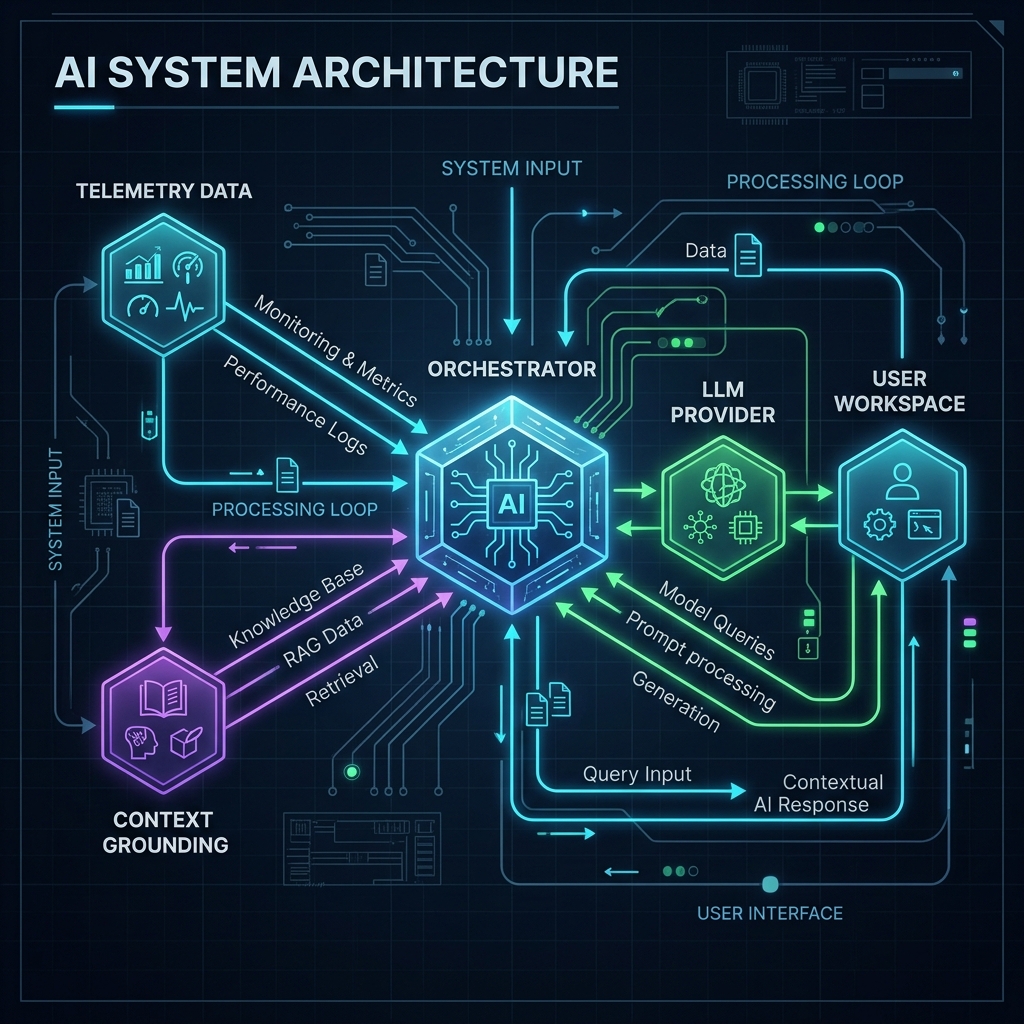
One of the biggest realizations during the project was that most of the experience existed outside the chat window. The success of every answer depended on layers users would never directly see.
Rather than treating these as backend concerns, I began designing them as part of the product experience:
- Configuration: Setting up secure providers and connecting model pipelines.
- Context Injection & Grounding: Structuring data requests to focus LLMs on local telemetry.
- Prompt Orchestration: Running background verification to cross-check model predictions.
- Operational Health: Measuring system latency, token load, and system connectivity states.
Architectural Realization
By treating configuration, security filters, and data grounding as core UX flows, we removed administrative friction and prevented system failures early in the lifecycle.
Constructing The Experience Architecture
Instead of designing screens first, I mapped the lifecycle of the product. The experience naturally organized into four interconnected systems:
Onboarding Intelligence
Helping organizations connect AI providers, models, and security data sources securely.
Knowledge Discovery
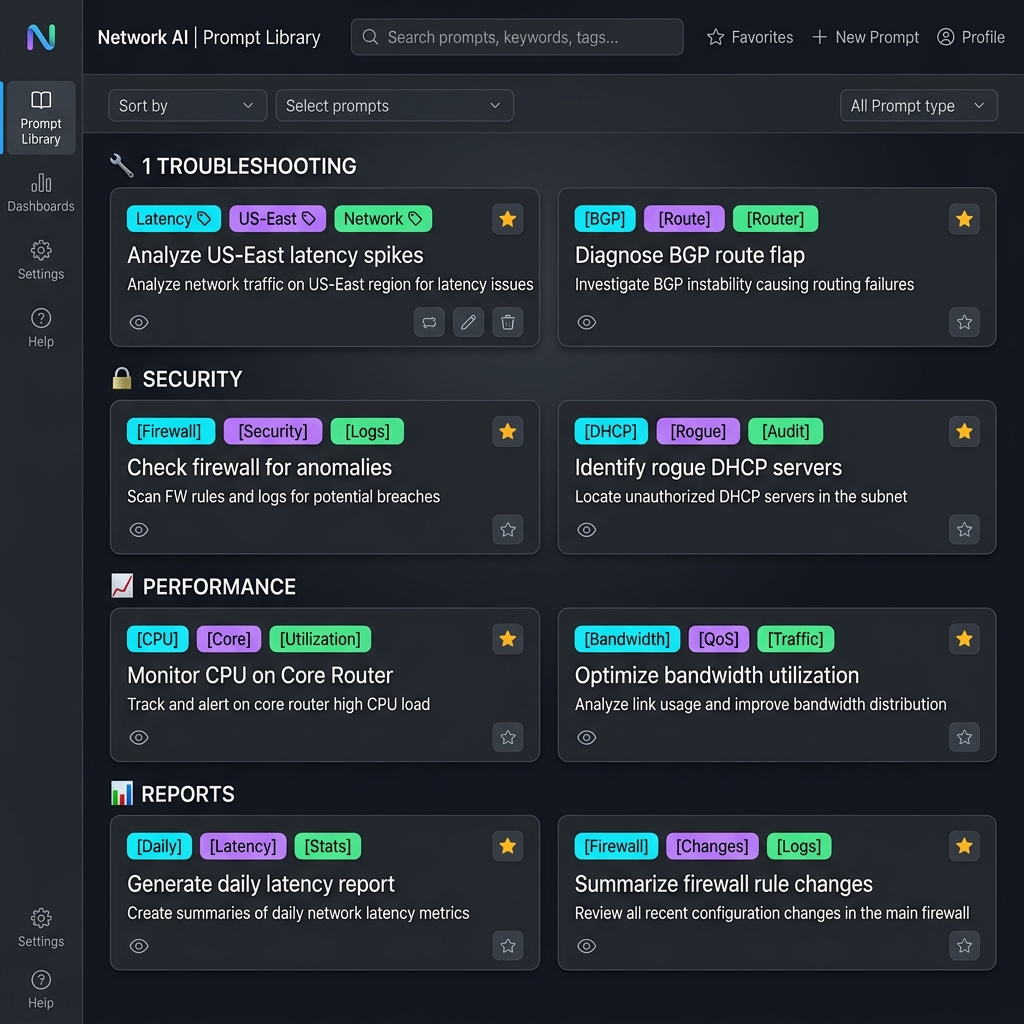
Helping users understand what questions are possible, introducing a navigable Prompt Library.
Answer Confidence
Helping users trust and validate responses through visual telemetry grounding and traces.
Operational Visibility
Helping administrators understand system health, token limits, and model latency states.
Exploring The Future State
With the architecture established, I explored multiple directions. Rather than focusing on individual screens, I explored distinct experience models:
Direction A: AI Assistant
A lightweight conversational panel overlaying the existing UI.
- Pros: Highly familiar, quick learning curve.
- Cons: Weak discoverability for complex tasks, limited layout scaling.
Direction B: AI Workspace
A rich, separate investigation canvas centered entirely on the prompt log.
- Pros: Extremely powerful, handles massive data queries.
- Cons: High complexity, disjointed from main monitoring.
Direction C: Guided Intelligence Platform
A balanced interface combining conversational exploration with standard canvas workflows.
- Pros: High trust, progressive disclosure, direct interaction link.
- Selected: Ultimately became the product foundation.
Designing For Trust
Trust emerged as the most critical design problem. Users weren't evaluating the visual interfaces; they were constantly evaluating the **credibility of the answers.**
This shifted the design focus from simple query inputs toward grounding and contextual consistency:
Answers should automatically digest active telemetry metadata and user preferences.
Users must see the exact query logic and data sources behind every chart.
System outputs should match platform terms, avoiding LLM semantic drift.
AI statuses (grounding, processing, confidence levels) should be clearly communicated.
Reimagining Configuration
One of the most significant design opportunities involved setup and administration. The existing model relied heavily on manual YAML file declarations. While technically flexible, it created friction, increased setup mistakes, and reduced transparency.
Administrators had to write, validate, and upload YAML configurations in terminal shells to connect model providers and declare context limits.
model: gpt-4-turbo
grounding_paths:
- /var/telemetry/us-east
- /var/telemetry/us-west
A visual, multi-step onboarding wizard. The system handles api validations instantly, reports connection status visually, and guides administrators through selecting data regions.
- Progressive disclosure: Splits settings into logical blocks.
- Input validation: API key validation happens on entry.
- Lower cognitive load: Eliminates file syntax errors completely.
Creating A Knowledge Layer
As the product evolved, prompt discovery became increasingly important. The challenge was no longer simply answering questions; the challenge was **helping users understand what questions were possible.**
This led to the concept of a unified **Prompt Library.** The library transformed prompts from isolated shortcuts into a navigable knowledge system.
- Categorized Search: Filter prompts by Troubleshooting, Security, and Performance.
- Personalization: Save favorites, keep prompt histories, and review system recommendations based on telemetry triggers.
Designing For Enterprise Reality
Enterprise AI products must do more than generate answers. They must be deployable, supportable, and governable. This realization expanded our design scope.
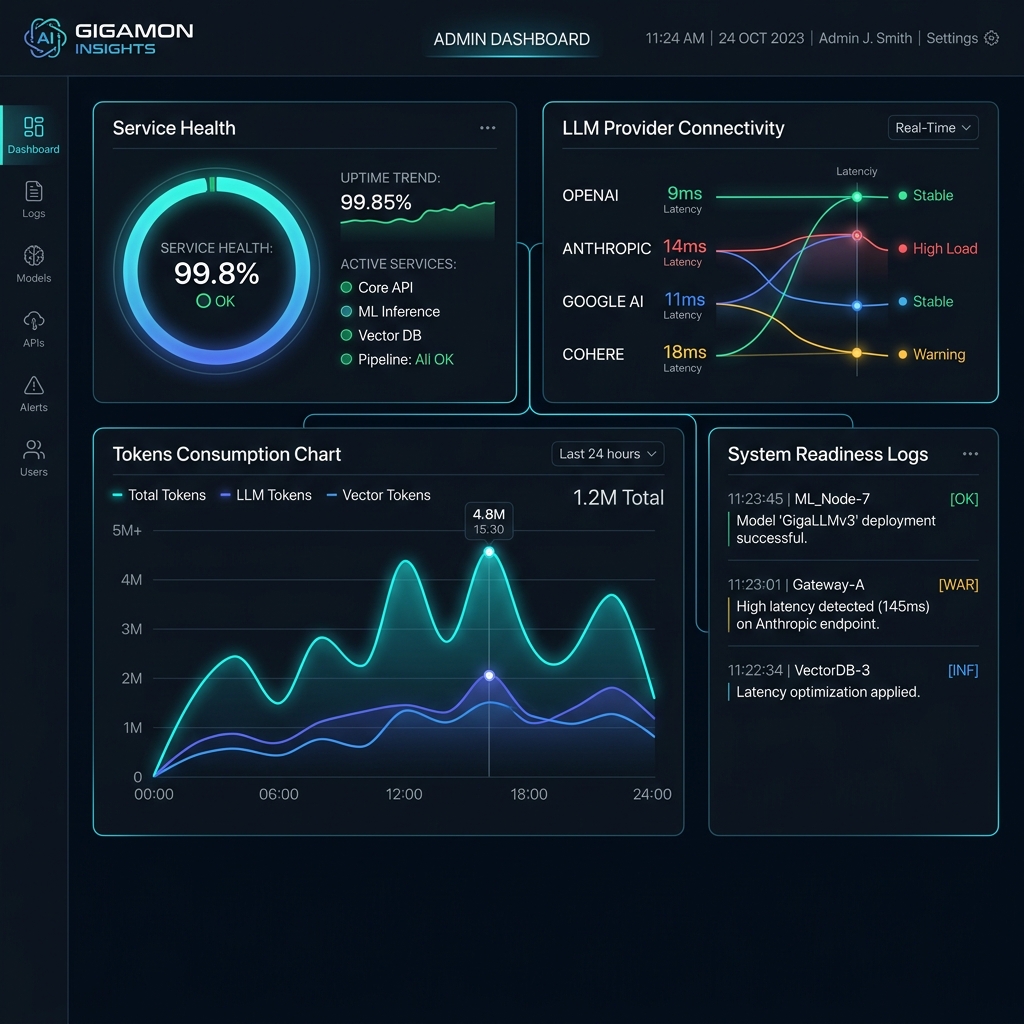
The product needed visual, administrative dashboard modules indicating:
- Service Health & Readiness: Live indicator dials and service alerts.
- LLM Provider Connectivity: Detailed endpoints performance logs (e.g. OpenAI, Google AI, Anthropic).
- Tokens Consumption tracking: Auditing usage trends to forecast cost metrics.
What Emerged
The final experience became much more than an AI assistant. It became a new, strategic interaction layer between users and complex network intelligence.
From Chat → Investigation
From Prompts → Workflows
From Features → Systems
AI Capability → Enterprise Product
Reflection
"The most interesting lesson from this project was that the hardest design challenge wasn't creating a conversational experience. It was designing confidence."
When users interact with AI, they aren't simply evaluating usability. They are constantly asking:
Everything in the product—from onboarding to prompt discovery to operational visibility—was ultimately designed to answer that question.